Why Rosoka is the ‘no-brainer’ plug-in for IBM i2 Analyst’s Notebook

Why Rosoka is the ‘no brainer’ plug-in for IBM i2 Analyst’s Notebook

It’s no secret that i2® is a popular choice for visualising and analysing data. That’s why in 2011 IBM paid a rumoured $500 million to acquire the small British software company. Its flagship product: Analyst’s Notebook has now become the standard for charting data and is used in nearly all of the UK police forces. If you have a sporadic flow of data in formats that vary greatly, IBM i2 is still one of the most compelling tools on the market.

IBM i2® products have always worked well with structured data. This has given its users the ability to ‘bring to life’ data hidden in columns and rows. There are many other places that data can hide though and one of those places is in unstructured text.

Unstructured Data

Unstructured text can pose a challenge to analyse and understand, and we keep generating more of it every day. This text can be anywhere from documents, emails or social media posts. In March 2018 we wrote a blog detailing how data hidden in unstructured text can be utilised. It focussed on the use of Natural Language Processing and particularly Entity Extraction. You can read it here. That blog post concentrated on what could be done using freely available tools.

At the time we stated that there are many commercial offerings that offer that functionality but in a much slicker and easy to access interface. One of those tools is Rosoka Text Analytics. Rosoka is an industry leader of text analytics solutions. Their enterprise solution Rosoka Server is great for large scale analysis of unstructured data. This blog is about their standalone solution which is a plug-in for i2.

Rosoka

Rosoka Text Analytics

So, why is it a ‘no-brainer’?

Well, to start off with its fully integrated with IBM i2 Analyst’s Notebook. It’s a plug-in that has been created in close collaboration with IBM and you can tell. We tested the plug-in against several datasets, including the case study we used in the previous blog post. This data can be found here.

Here are the reasons why we think it’s a ‘no-brainer’ plug-in:

  • It extracts entities and links from unstructured files such as PDF’s, Word documents and txt files. It then allows users to generate Analyst’s Notebook charts based on the content
  • Processing time is quick compared to reading the documents manually and quicker than the free extraction engines used in our previous blog
  • During testing we found the entity extraction to be very accurate. What was more impressive was the relationship extraction. In our previous blog we inferred links based on how many times two entities are mentioned in the same document. What Rosoka do is far more sophisticated and is based on the language around the two entities
  • Entity extraction is good but it can create a lot of noise. Rosoka’ s use of Salience (relevance) means we could always find the most relevant extracted entities and ignore the others
  • Rosoka applies entity resolution to its extraction. This meant that if Theresa May is mentioned as ‘Theresa’, ‘Mrs May’ or even ‘She’ in a document, Rosoka will be able to resolve these different texts as one entity.
  • It’s easy to reclassify an extracted entity from say a person to a company (for example Robert Dyas the UK hardware store). Rosoka can also learn from your decisions so it doesn’t make the same mistake again
  • Rosoka is truly multilingual. We tested this by running several news articles about Islamic State through Rosoka in different languages. The organisation Islamic State was mentioned in both the Russian and the Arabic news articles. On the chart they were resolved into one entity, despite them originating from two different languages. That meant that when we expanded Islamic state we got linked items from both the Russian and the Arabic articles.
  • The most surprising reason Rosoka is a no-brainer though is the price. For a fraction of the cost of IBM i2 Analyst’s Notebook the plug-in delivers accurate, multilingual, unstructured data analysis. We’ve looked at costs for this type of technology for clients before and often the requirements were dropped, due to budget restrictions; well not with Rosoka!

In conclusion, we believe Rosoka is a ‘no-brainer’ plug-in for i2 Analyst’s Notebook. The functionality, ease of use and price will just make any analysts life easier!

For more information on Rosoka visit their website or contact S-branch. If you’d like to find out more about unstructured data analysis, then feel free to call.

S-branch offers independent advice, meaning if Rosoka is not for you at this time, we can help you find the solution that is.

Who ya gonna call? A Forensic Accountant…

Forensic Accounting Software

A lot of people won’t know what a forensic accountant is. I didn’t. It was only when I started working with a team of them at a prestigious accountancy firm that I really got to appreciate the importance of the role and the people that do it.

A forensic account is someone who applies accountancy skills to investigate financial discrepancies and inaccuracies. These investigations will be used to find fraudulent activity, financial misrepresentation or even misconduct.

There is one word I would use when describing forensic accountants and that is versatile

Who ya gonna call?

The truth is a forensic accountant could be useful to a lot of us.

If you run a business, for example, you may believe that there is some internal fraud going on – who ya gonna call? A forensic accountant. You may be about to buy a business and want to know more about its books – who ya gonna call? A forensic accountant.

On a personal level you and your siblings may have been left money or maybe you are going through a divorce and believe money is being hidden from you. That’s right, a forensic accountant can help with these things.

Business evaluations, tax audits, insurance term reviews, stolen paper records; there are a lot of situations where a forensic accountant can help.

Skills

There is one word I would use when describing forensic accountants and that is versatile. I’ve seen them successfully deal with sporadic and often unhelpful data to help a client. This is due to the diverse range of investigations they may conduct.

Applying technology to help clients make sense of sporadic and often unhelpful data is what S-branch does best.

Alongside obvious structured data sources such as companies house records, a forensic accountant may receive data in all manner of ways: boxes full of documents, ceased laptops or mobile phones, ancient financial records, interview videos and recordings to name but a few.

How S-branch can help

S-branch

Trusted Analytics Consultancy

Applying technology to help clients make sense of sporadic and often unhelpful data is what S-branch does best. S-branch is truly independent and remains software agnostic, ensuring our clients get the best solution for their needs; whether they need forensic accounting software or just somewhere to store their intelligence.

Here are some of the ways S-branch can help forensic accountants.

Visualisation Software

Finding hidden connections between different data sources, whether that be financial transactions or social media, requires a good eye. This becomes especially important when you are trying to ‘follow the money’.

The use of visualisation analysis tools or graph visualisations to understand complex data is now common among analysts. Otherwise unseen connections between data can be identified and drilled down upon with ease. Visualisation tools also offer a clear way to present findings and share results.

Unstructured Data Analysis

Large amounts of text can pose a challenge to analyse and understand. We keep generating more of it every day. This ‘unstructured text’ can be in documents, emails or social media posts. Indexing this text can help when searching for keywords, but what if you don’t know the keywords? What if you don’t know where to start?

Unstructured data analysis software allows machines to ‘read’ unstructured text. This could give an understanding of what entities (for example people, organisations or locations) are present in the text. Some of these tools also extract relationships from the sentences and are even multi-lingual making the initial analysis of large amounts of documents quick and easy.

Visual/Audio Analysis

Manually documenting the content of video and audio files is a time-consuming process. Depending on what you are investigating it may also be an impossible task.

The use of cognitive technology to transcribe or even reference known items held within audio and video content can unlock the intelligence held within this kind of media.

Intelligence Data Stores

Having a secure and audited place to hold intelligence as part of a case is of real importance to a forensic accountant. A place where all details of an investigation can be quickly and accurately searched.

A lot of good data stores use the POLE model (People, Objects, Locations, and Events). By framing data in this way, relationships can easily be captured and explored. Intelligence stores will also hold relevant charts, visualisations or even referenced documents, ensuring everything of relevance is in one place.

Companies House Integration

Companies house is a great free resource where you can get access to company information, current and resigned officers or insolvency information.

Making regular queries of companies house through their website is easy, but taking that information and collaborating it with other data sources can be a manual task which is time-consuming. By integrating this resource alongside your intelligence data store it is easier and quicker to see the full picture.

Are you a forensic accountant? Are the technologies above of interest? Or are you struggling with some other form of data you’ve received? Either way, S-branch would love to help.


Analysing and understanding text

Library

Introduction

Large amounts of text can pose a challenge to analyse and understand. We keep generating more of it every day. This ‘unstructured text’ can be in documents, emails or social media posts. Indexing this text can help when searching for keywords, but what if you don’t know the keywords? What if you don’t know where to start?

This post describes some of the technology and techniques that are available. It focusses on free to use (but not to distribute) software. It will not focus on particular commercial software; although some products are mentioned.

The Data

royal_commission

Case Study 21

The data I’ve used for this is real. A case study from a public inquiry into Satyananda Yoga Ashram at Mangrove Mounting (Australia) for allegations of child sexual abuse. The allegations are made against a spiritual leader Akhandananda in the 1970’s and 1980’s with submissions from survivors, held in multiple documents.

https://www.childabuseroyalcommission.gov.au/case-studies/case-study-21-satyananda-yoga-ashram

WARNING: The content of these documents are disturbing. Reader discretion is advised. 

Natural Language Processing
To help understand the data within these documents, I’ve first used Natural Language Processing (NLP). NLP allows machines to ‘read’ unstructured text. One of the ways NLP evaluates a document is: Named Entity Recognition (NER). NER gives an understanding of what entities (for example: people, organisations or locations) are present in the text.

Natural Language Processing

Natural Language Processing (NLP)

To demonstrate NLP I’ve used free software created by Stanford University. There are many other good commercial NLP products on the market offering various language/analytic capabilities.

Statistical Analysis

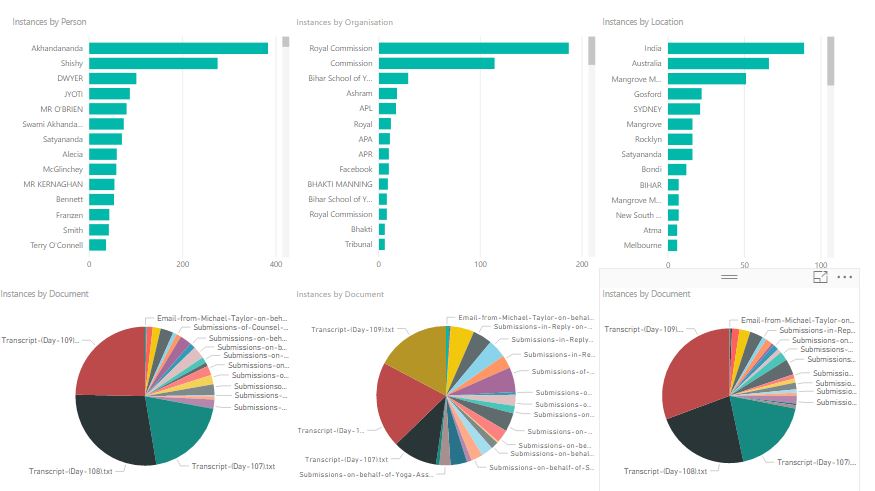
To give meaning to the results of the NLP I’ve summarised the documents and their contents dependant on the entity type. In this example, I’ve stuck with people, organisations and locations. Below is a statistical visualisation.

Statistical - PowerBI

Statistical – PowerBI

For each entity type, a count of occurrences is shown as well as document coverage. ‘Akhandananda’ is the person that has appeared the most times and the document ‘Transcript – Day 108’ contains the most people.

This basic visualisation was built very quickly using the free version of PowerBI. The free version allows you to create visualisations but limits the sharing options available. There are other good tools available for this kind of analysis, most offer free trials which is great if you want to compare functionality.

Visual Analysis

To take the analysis further I really needed to load the results into a database. I chose a graph database, simply because graph databases perform well with entity data such as people, organisations and locations.

For this example, I’ve loaded my data into Neo4j Community Edition which is free to use (under the GPL v3 license). If I was building something commercial which needed to scale then Neo4J offer commercial licenses as well.

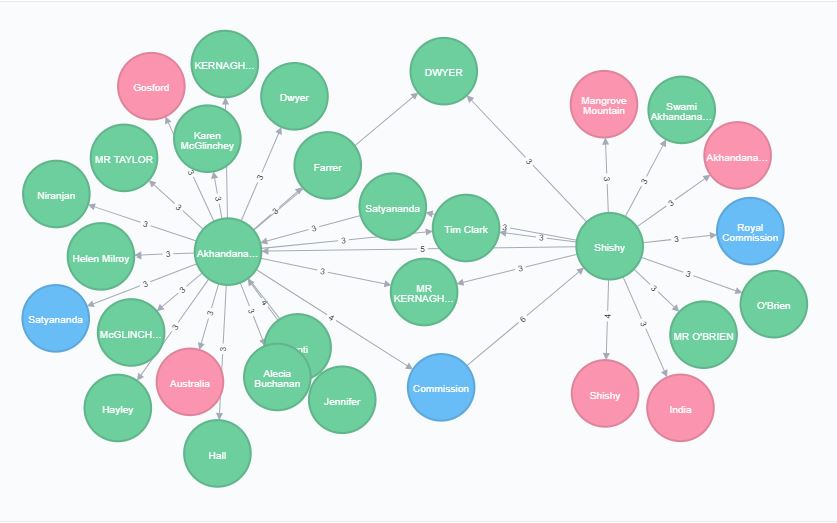
Once modelled, I could easily generate networks uncovering interconnecting entities within the data. The resulting visualisation is based on a short query. People are represented in green, organisations in blue and locations in pink.

Inquiry Network

Inquiry Network

Here we can see that Akhandananda and Shishy are key entities, mentioned alongside a lot of other entities. We can also see that Commission, Satyananda, Tim Clark, DWYER etc are linked to both Akhandananda and Shishy. These now become entities of interest.

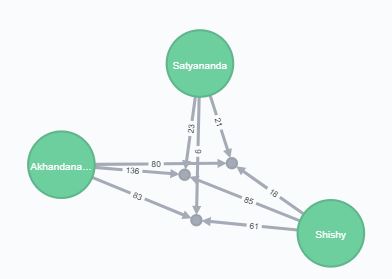
This gives a place to start. I first concentrated on Satyananda. Satyananda is a complicated entity as it’s the name of an individual and also the Yoga organisation. In this case, NLP has pulled out Satyananda the person. I used Neo4J to drill down into these entities, showing three documents that all entities were linked to. This time the numbers on the links refer to the occurrences of that entity in that document.

Document Network

Document Network

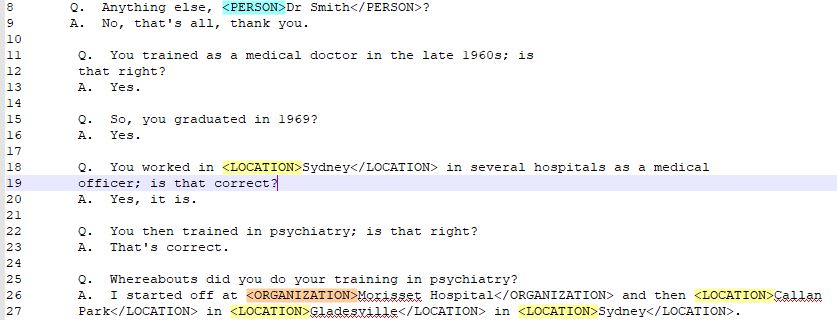
A quick look through those three documents soon shows Satyananda, Akhandananda and Shishy being mentioned together multiple times. The subject matter is disturbing, so I’ve chosen the text carefully. Below is a screenshot where Shishy is mentioning both Satyananda (as a person) and Akhandananda when being questioned.

Highlighted Text

Highlighted Text

Summary
Using a mixture of NLP, statistical and visual analysis tools allowed me to very quickly narrow down which documents and entities are of interest.

In truth, with a small dataset like this (under 40 documents) reading each document manually is another valid option. NLP is also not completely accurate and cannot fully replace the human touch. If faced with 1000 + documents then techniques like above can really help direct analysts to the key information.

This is a demonstration only and focusses on freely available tools. There are many commercial offerings that offer the functionality described above (and more) in one seamless application. If you are looking for fraud or crime in unstructured text then S-branch can help guide you to the appropriate products available.